When and How to Stop Google Chrome From Running in the Background

By default, when you close Google Chrome, the browser window closes, but the application itself continues to run in the background. There are a few reasons for this.

First and foremost, this makes it faster to open a new browser window. Since Chrome is already running in the background, there is less that has to take place behind the scenes before your new browser window appears.  This makes the browser feel quick, even on slower machines.

Running in the background also allows any Chrome extensions you might have installed to continue to operate. These are applications that run within Chrome and either enhance the browser’s existing features, or add new ones. Extensions range from those that change Chrome’s background colors to those that add support for third party applications.

This behavior, however, might not always be desirable.

If you are running an older or less powerful computer, you might find that forcing Google Chrome to stop running in the background could noticeably improve the overall performance of your computer.

Similarly, if you are using a laptop, having Google Chrome running in the background could negatively impact your battery life.  By forcing Chrome to close completely, you might find you can stretch your battery life just a little further.

If you fall into one of these two categories, or would simply prefer to avoid having Chrome run in the background, you can follow the instructions below to disable this behavior.

In Google Chrome:

1. Select “Settings” in the Chrome Menu
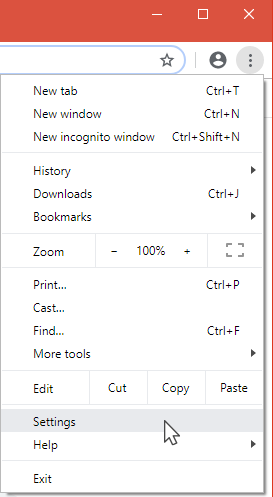
2. Click on “Advanced” at the bottom of the settings page that appears.

3. Under the “System” heading, find the box next to “Continue running background apps when Google Chrome is closed.”

By default, the toggle button next to that text will be set to the right with a blue background.  To prevent Chrome from running in the background, simply click the button so that the toggle is to the left, with a gray background (see screenshot above).

If, in the future, you decide you would like to allow Chrome to run in the background once again, simply repeat the steps above and move the toggle back to the right.


The Importance of Server Maintenance

Let’s face it, servers, like any piece of hardware, will eventually need to be replaced, but in the meantime, keep it running until it’s time to replace it. Developing a checklist of the tasks that need to be done regularly can go a long way in ensuring your servers consistently perform at their best. Because servers take care of all your data, it is important to watch and properly care for them. Such maintenance involves constant monitoring and continuously analyzing how the server is functioning. Preemptive maintenance not only reduces server issues, but also may increase the longevity of your server.

When To Replace a Server

Every IT professional would agree that servers are the lifeblood of your organization. No matter what daily task you perform, whether it is responding to email, preparing for a presentation, or completing other workday tasks, it’s important to have a server in your office that runs smoothly. No organization, no matter what the size, wants to face the IT issues associated with a slow or non-responsive server. While there is no way to accurately predict when a server will need to be replaced, there are some general guidelines you should observe to ensure that this critical piece of equipment is running properly.

Bryley’s Prestigious Channel Partners 360° Award Celebrates Fall

After being honored as one of 25 recipients worldwide, our prestigious award is traveling the U.S. in celebration – being one of the most sought-after in the industry of technology solutions.  This month it stayed local to celebrate Fall in New England

HAPPY HALLOWEEN!

Bryley is getting into the Fall spirit.  Stop by on Halloween
as we join several other businesses in Hudson to hand out
treats to the youth in our community.


Cathy Livingstone hands out candy to local residents.

All Aboard!

The cutest mouse trap we’ve ever seen!


“Bryley Systems works toward continuous improvement; we strive to manage, optimize, and secure our client’s information technology, which brings substantial business benefit and value to their organizations. Our team-focused, best-practices-oriented approach, coupled with high-value/low-risk service options, enables us to provide our clients with Dependable IT at a Predictable Cost™.  We thank Channel Partners for this prestigious Channel Partners 360° award!”                      

      – Gavin and Cathy Livingstone, Co-Owners, Bryley Systems, Hudson, MA

Bryley’s Prestigious Channel Partners 360 Award Travels the U.S.

After being honored as one of 25 recipients worldwide, our prestigious award is traveling the U.S. in celebration – being one of the most sought-after in the industry of technology solutions.

About Bryce Canyon. Bryce Canyon National Park in Southwestern Utah is famous for the largest collection of hoodoos—the distinctive rock formations at Bryce—in the world. Pillars of red, white, and orange cut through bluest skies, forming some of the world’s most famous breathtaking views. Bryce Canyon first became a tourist destination in 1916 with Union Pacific. It was then declared a National Monument in 1923, and officially established as a National Park in 1928.

 “Bryley Systems works toward continuous improvement; we strive to manage, optimize, and secure our client’s information technology, which brings substantial business benefit and value to their organizations. Our team-focused, best-practices-oriented approach, coupled with high-value/low-risk service options, enables us to provide our clients with Dependable IT at a Predictable Cost™. We thank Channel Partners for this prestigious Channel Partners 360° award!”                

    – Gavin and Cathy Livingstone, Co-Owners, Bryley Systems, Hudson, MA

Bryley Receives Prestigious Channel Partners 360° Award!

April 11, 2017 — Bryley Systems is pleased to announce that it has been honored by Channel Partners, with the 2017 Channel Partners 360° Business Value Award.  We are one of only 25 technology-oriented companies worldwide to receive this award, which is one of the most sought-after in the industry.

This award honors service providers that are taking a holistic approach to technology solutions and creating business value for their clients and have a well-rounded portfolio.  Channel Partners started “as a simple idea to reward partners of all sizes for creating business value for their customers through telecom, IT, and cloud solutions…” and “rewards channel partners – agents, VARs, dealers, system integrators, MSPs and consultants – of all sizes for innovation, solutions-orientation and customer focus.”

Bryley’s President, Gavin Livingstone and co-owner, Cathy Livingstone, were on hand to accept the award stating “Bryley Systems works toward continuous improvement; we strive to manage, optimize, and secure our client’s information technology, which brings substantial business benefit and value to their organizations. Our team-focused, best-practices-oriented approach, coupled with high-value/low-risk service options, enables us to provide our clients with Dependable IT at a Predictable Cost™.

We thank Channel Partners for this prestigious Channel Partners 360° award!”

Award recipients were honored at a ceremony on April 11 at the Channel Partners Conference & Expo in Las Vegas.

Tour of the new maintenance facility of the WRTA

Bryley’s President, Gavin Livingstone, who currently chairs the Worcester Regional Chamber of Commerce (WRCC) Ambassadors, arranged for a group of 20 WRCC Ambassadors and staff to tour the new Worcester Regional Transit Authority (WRTA) maintenance facility at 42 Quinsigamond Avenue, Worcester. The tour was conducted by Jim Parker, General Manager of Central Mass Transit Management Inc. (CMTM), which operates and maintains all of the WRTA buses and facilities.

Touring Maintenance Facility

Created in 1974, the WRTA is the second-largest regional transit authority in Massachusetts, servicing Worcester and its surrounding 37 communities. WRTA buses typically run continuously from early morning through midnight (with some holiday exceptions); seven days a week, 365 days a year.

The WRTA’s new, 156,000-square-foot facility is roughly double the size of the original, outdated garage, which was built in 1928 as a trolley barn. The new facility is large enough for 75 transit buses and 30 vans (the current fleet includes 52 buses), and has nine maintenance bays. Buses enter the facility and head to a refueling bay where they can get a wash, repairs, fluid checks and adjustments – even get repainted – before rolling back into service.

Window View from the Upstairs Office


The new facility is also home to significant, up-to-date technology, including a WRTA BusTracker app, Track by Text, Track by QR Code, and WRTA-schedule/ tracking Kiosks located throughout the city.

Control Center

All operations run through the sophisticated Control Center, which is continuously manned when buses are on the road.

In 2014, Bryley Systems – the Managed IT provider for CMTM and the WRTA – designed and deployed an IT-infrastructure platform to support the technologies listed above, but with managed redundancies to allow continuous operation. (For details, see “Transportation Company Relies on Bryley Systems to Stabilize Technology Platform and Create Blueprint for the Future” for details.)

Wi-Fi is not Wireless Fidelity

Garin Livingstone and Gavin Livingstone, Bryley Systems Inc.

Wi-Fi is not an abbreviation for wireless fidelity1; it is a trademarked phrase that refers to wireless communication between electronic devices and a Wireless Local Area Network (WLAN) based on the IEEE 802.11x standards.

Wi-Fi is brought to us by the Wi-Fi Alliance®, a worldwide network of companies with the mission to drive the adoption and evolution of Wi-Fi globally.  The Wi-Fi Alliance tests and certifies that WLAN equipment meets its stated standards.

Current standards include:

  • 11g
  • 11n
  • 11ag

Speeds have grown substantially, now rocketing up to a potential 1,300Mbps using the latest WiGig™, 802.11ac, standard (although actual performance is typically significantly less than its potential).

wifi-standard

At their core; wireless networks are less secure than wired networks (since a potential intruders does not need a physical connection), although encryption technologies (Wi-Fi Protected Access or WPA and WPA2) exist to secure WLANs.

Large-scale Wi-Fi implementations include:

  • City-wide Wi-Fi – Free Wi-Fi provided in St. Cloud, FL, Sunnyvale, CA, etc.
  • Campus-wide Wi-Fi – Wi-Fi throughout a campus environment

1See ‘Wireless Fidelity’ Debunked by Naomi Graychase of WiFi Planet.

2See Wikipedia IEEE 802.11.

Recommended Practices: Basic training for IT end users

This is a multi-part series on recommended IT practices for organizations and their end-users.  Additional parts will be included in upcoming newsletters.

End users receive the benefits of IT, but usually with some pain involved, which they are glad to share with the IT administrators and technicians.  Oftentimes, the pain comes from not knowing the correct way to do something or from enabling malware; these can be avoided (or at least reduced) through proper training.

Training is usually considered optional, but the increased emphasis on security and compliance, along with the potential gains from trained users that are comfortable and knowledgeable with their IT assets and systems, can provide significant return on investment.

Training can play a critical role in the satisfaction of end users and in the security of the computer network.  It can provide end users with the knowledge to safely browse the Internet, reject harmful emails, and avoid trouble.  It is also important to define appropriate-use policies and demonstrate how to enter timely data into information systems.

Training topics

Generally, IT-oriented training occurs in these areas:

  • End-user equipment
  • Network resources
  • Applications
  • Policy
  • Security

End-user equipment

End-users have a myriad of devices, ranging from desktop PCs to terminals, tablets and other mobile devices; some have specialized items like hand-held scanners or terminals tied to a specific application.

The fundamentals are important:

  • Simple maintenance (cooling, ventilation, etc.)
  • How to operate the user interface (touch display, special keyboard, etc.)
  • Basic usage at the operating-system (Windows, Android, iOS) level

Ergonomics should also be considered; ensure that the equipment is optimized to the user’s body in the placement of displays, keyboards, mouse, etc. and that ergonomically correct accessories (gel-based wrist pads, comfortable seating, etc.) are provided and aligned properly.  (See Ergonomics Made Simple from the May 2014 edition of Bryley Tips and Information.)

Network resources

Resources available to end-users should be identified and demonstrated:

  • Printer features (b&w/color options, duplexing, etc.), location, and use
  • Multi-Function Printer (MFP) functions (faxing, copying, scanning) and use
  • Server names, basic purpose, shared folders, and access privileges
  • Conference-room display and wireless keyboard/mouse
  • Login credentials to Wireless Access Points (WAPs)

Labeling these resources makes them easier for end-users to identify.

Applications

Software applications fit a variety of functions, including:

  • Productivity suites:
    • Microsoft Office
    • Google Apps
  • Organization-wide:
    • Customer Relationship Management ((CRM)
    • Professional Services Administration (PSA)
    • Enterprise Resource Planning (ERP)
  • Utilities:
    • PDF readers and writers
    • Password managers
    • File compression
    • Storage
    • Backup
  • Prevention:
    • Email protection
    • End-point security
    • Web filtering

(Software applications are discussed in the September 2013 through January 2014 editions of Bryley Tips and Information.)

Policy

Usage policies focus on the organization’s permissiveness (and lack thereof); they are designed to specify proper use and discourage improper behavior.

Most organizations have at least these IT-related policies:

  • Authorized use of computer network and its resources
  • Internet, email, and social media use and etiquette
  • Information Security Policy

Security

Security relies heavily on policies, training, and protective applications; the human element is the largest security risk in any organization.  Policies and training should encourage end-user behavior that minimizes security risks; protective applications help to enforce policies and to detect and remove problems when they occur.

Security training should include, at a minimum:

  • Anti-virus/anti-malware protection
  • Preventing phishing attacks
  • Password guidance
  • Safe web browsing

Many organizations will provide continuous training and reminders; some setup internal honeypots designed to lure end users into inappropriate behavior so that this behavior can be addressed and corrected.

Training process and related factors

The training process:

  • Set training goals
  • Assess end-user needs
  • Tailor the delivery methods
  • Create the training program
  • Scale the program to the audience

Trainers should factor in these items:

  • Budget training at the beginning of the project
  • Consider the needs and learning styles of the end-users
  • Marry the business context of the need to the IT training

References

  • Sunview Software, Inc. reveals Deb Shinder’ her article: “Plan Your End-User Training Strategy Before Software Roll-Out”
  • Beth Stackpole of ComputerWorld makes her case in the March 13, 2008 article in CIO: “Five Mistakes IT Groups Make when Training End-Users”
  • Toni Bowers emphasizes the end user in the June 5, 2013 TechRepublic article: “You Know What’s Important About End-User Training? The End User”