

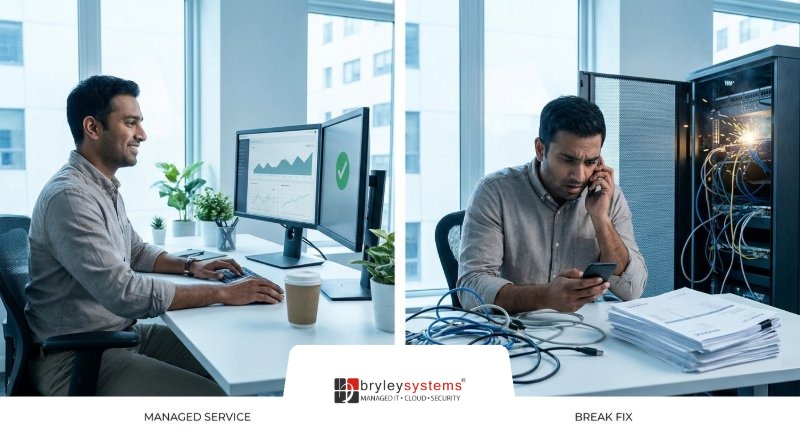

Break Fix Vs Managed Services: The IT Choice That Keeps Work Moving

Table of Contents
An operations manager shouldn’t wait on a stalled production line while someone decides who owns the ticket. A finance lead shouldn’t lose half a day chasing system access to approve invoices. That’s why the choice between break-fix vs. managed services matters: reactive IT support often runs $150-$350 per hour, turning everyday technology problems into budget surprises, approval delays, and stalled work. At Bryley, we believe technology should empower people, not slow them down.
Garin Livingstone, CEO at Bryley Systems, notes: “The right IT model gives leaders fewer surprises, clearer ownership, and a better path for keeping daily work moving.”
Break-Fix Vs. Managed Services And The Daily Cost Of Waiting
Reactive IT creates hidden work outside the IT queue. Managers chase updates, department heads reshuffle schedules, and frontline teams explain delays to customers, residents, riders, or clients. We see this across manufacturing, professional services, passenger transit, and local government in central New England, where a locked account, offline endpoint, or failed application login can slow the whole workday.
-
Approvals slow down. Finance waits on permissions instead of moving invoices, purchase orders, or service requests forward.
-
Supervisors become dispatchers. Ticket backlogs pull leads into follow-up work, and emergency after-hours support can include 50-100% surcharges.
-
Schedules lose breathing room. Outages interrupt production runs, client deadlines, transit routes, or permit windows.
-
Budgets stay unclear. Repair bills arrive after the problem has already affected work, then compete with planned projects, renewals, and security improvements.
| Operational Area | Early Warning Metric to Track | Likely Root Cause to Investigate | Practical Control to Add |
|---|---|---|---|
| Accounts payable and purchasing | Number of invoices or purchase orders awaiting system access for more than 4 business hours | Expired Active Directory group membership, failed MFA enrollment, or ERP role mismatch | Monthly access review owned by Finance Operations, with IT validating ERP and identity records |
| Manufacturing floor operations | Minutes of workstation, label printer, or shared drive downtime during first shift startup | Aging endpoint hardware, unmanaged Windows updates, or unstable network switch ports near production cells | Pre-shift device health check with automated alerts routed to IT before line supervisors begin scheduling work |
| Professional services delivery | Client deadline changes linked to VPN, file sync, or Microsoft 365 access issues | License provisioning gaps, conditional access misconfiguration, or overloaded helpdesk escalation path | New-hire and project-start checklist requiring account, Teams, SharePoint, and VPN validation before kickoff |
| Passenger transit dispatch | Radio, dispatch console, or route management system incidents occurring during pull-out windows | Single internet circuit dependency, unsupported workstation image, or delayed vendor escalation | Failover connectivity test and vendor contact matrix reviewed quarterly by Operations and IT leadership |
| Municipal services | Public counter transactions delayed by permitting, tax, or records system interruptions | Legacy application dependency, insufficient backup testing, or unclear approval path for emergency changes | Department-specific continuity runbook with clerk, treasurer, department head, and IT responsibilities documented |
Break Fix Services Inside A Real Operating Day
Reactive support isn’t just an IT workflow. It changes how nontechnical teams spend their day because break fix services usually begin after work has already stopped. It’s like calling a plumber only after water is already on the floor.
Real-world snapshot
A manufacturer waits for a shipping label printer to reconnect while finished goods sit near the dock. A professional services firm loses access to client files before a filing deadline. A local government clerk can’t process resident requests because a workstation is down. A quick repair billed by a freelance technician can run $75-$150/hour before specialized work is added.
In each case, the visible problem is technical, but the real cost shows up in handoffs: the shipping team can’t close the order, the project lead can’t send the final file, and the clerk has to ask a resident to wait.
What if the Hours You Spent Researching IT Could Be Replaced by Five Better Questions?
You don’t need to learn cybersecurity or infrastructure management. You just need to know what to ask — and what to listen for.
Managed Services And Break-Fix Choices That Shape Growth
IT support models shape growth when leaders spend less time reacting to interruptions, filling staffing gaps, and guessing what’s happening across systems. As of 2025, managed services account for about 25-30% of the overall IT services market, reflecting a move toward ongoing infrastructure and application management.
The practical question is simple: which model helps your people keep approvals, tickets, and customer handoffs moving? The answer usually starts with endpoint support, backend infrastructure, cybersecurity, and compliance planning. Bryley’s Comprehensive Support Program, or CSP, can cover end users, backend systems, or both, with Tier 1 to Tier 4 support separating routine password resets from complex security events.
That separation matters. A locked account shouldn’t wait behind a network issue affecting dispatch, and a possible identity-based attack shouldn’t sit in the same lane as a printer ticket.
Explore Managed IT Service Options
Break-Fix Support Services And Business Risk Planning
Support model decisions affect risk reviews, security visibility, budgets, and customer service, especially when reactive IT still represents 54.55% in 2025 of the North American IT services market.
-
Uptime affects daily scheduling. When systems fail without proactive monitoring, teams reroute tasks, reschedule work, and explain delays. Managed services are associated with an 85% reduction in unplanned downtime compared with repair-only models.
-
Security needs wider visibility. EDR and ITDR help teams monitor workstations and user identities together. That matters when a clean-looking device is paired with unusual account behavior.
-
Audits require usable records. CMMC, DFARS, and PCI-driven reviews need documentation, access records, and repeatable ticket history. Without that structure, teams chase screenshots, approvals, and old email threads.
-
Escalation needs clear ownership. A small provider can earn $80,000 per year from repair-only work and still struggle when ownership is unclear. A defined escalation path keeps routine support, engineering work, and security concerns from competing for the same next step.
-
Planning needs stable numbers. Leaders need support, renewals, and risk work aligned to budget cycles. When IT costs only appear after something breaks, finance and operations plan around guesses.
Managed Services Over Break Fix For Smoother Handoffs
Changing IT support models can feel difficult because tickets, approvals, vendor renewals, and system issues are already in motion. The goal is to reduce friction in handoffs, especially when 3 in 4 companies now expect managed services to support transformation and innovation, not just fixed tasks. Moving from break fix to managed services is like checking tire pressure, tread, and alignment before a long trip instead of changing a tire after a blowout.
-
Map recurring tickets by department. Sort issues by business impact, such as delayed invoices, stalled production work, transit scheduling problems, or public service requests.
-
Identify systems that stop work. Flag revenue, production, transit, or public service platforms, then connect those systems to the people, vendors, and approval paths needed when something goes wrong.
-
Review security gaps. Connect endpoints, identities, backups, and access changes so risk reviews reflect how work actually moves between devices, users, files, and systems.
-
Define visibility needs. Include systems, tickets, projects, activities, documentation, client portal views, and local on-site support when remote help isn’t enough. We don’t believe clients should be left wondering what happened to a request or which project step comes next.
Choosing An IT Model That Keeps Work Moving
The right IT model gives teams fewer interruptions, clearer ownership, stronger security visibility, and support that fits how the organization works. For a finance manager approving invoices, a dispatcher managing route updates, or a plant supervisor watching production schedules, that means fewer stalled handoffs and cleaner information when decisions need to be made.
Across central New England, we support that work with a local team and no outsourced helpdesk. We’ve been serving organizations since 1987, and our month-to-month agreements include a 45-day opt-out. If you’re weighing the right support model, contact Bryley Systems for a straightforward conversation about what needs to change, what should stay steady, and how to keep your next invoice approval, route update, or production handoff moving.
